1
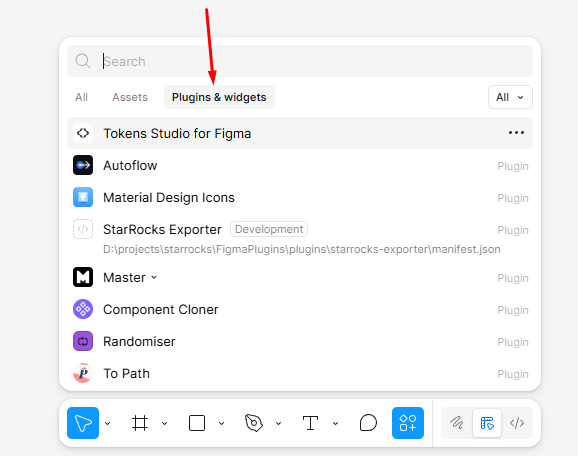
Open Plugins & widgets
In Figma, click Resources on the bottom toolbar and switch to the Plugins & widgets tab.
Download the latest public build for each platform and review fixes by version below.
Free plugin.
Adopts the shared StudioShell UI with Builder, Help, and Settings tabs plus unified Pixso controls while preserving queued apply delivery.
Adopts the shared StudioShell UI with Builder, Native, Help, and Settings tabs plus unified Figma controls while preserving dynamic connector redraw.
Add Autflow-style generated arrow controls with manual start/end anchors, icon head controls, and a deterministic sketch line style.
Enable Native seed mode in Figma Design by cloning an existing pasted FigJam connector when direct connector creation is unavailable.
Add Autflow-style generated arrow controls with manual start/end anchors, icon head controls, and a deterministic sketch line style.
Restore dynamic arrow redraw for the current selection without checking every saved connection, improving performance in large Pixso files.
Detect whether Figma exposes native connector creation to plugins and disable the Native action gracefully when the Design editor API does not provide it.
Add a Figma-only Native tab that creates Figma ConnectorNode lines with live platform redraw while keeping the generated-arrow Builder mode available.
Make Figma selection handling fully targeted by using endpoint connection references, so selecting a layer no longer scans the whole page while dynamic redraw stays enabled.
Restore dynamic arrow redraw for the current selection without full-page polling, improving large-file performance while connected selected layers move.
Add an English Help tab with click-by-click flow examples, add in-plugin documentation links, and publish refreshed Flow Arrows documentation on chtools.pro.
Stop background full-page polling while the plugin is open, improving performance in large Figma files with many components.
Add an English Help tab with click-by-click flow examples, add in-plugin documentation links, and publish refreshed Flow Arrows documentation on chtools.pro.
Compact the Flow Arrows interface, remove extra promotional panels, keep Apply visible at the top, and make sliders smaller and cleaner.
Compact the Flow Arrows interface, remove extra promotional panels, keep Apply visible at the top, and make sliders smaller and cleaner.
Keep selected-arrow mass updates aligned with Figma: existing connectors refresh in place without creating extra links.
Fix mass updates for selected existing arrows so Create / Update refreshes those connectors without creating extra links between neighboring arrows.
Add H-H, H-V, V-V, and V-H route pairs and let selecting an existing arrow act like selecting its two connected endpoint layers.
Add H-H, H-V, V-V, and V-H route pairs and let selecting an existing arrow act like selecting its two connected endpoint layers.
Replace route choices with H-H, H-V, V-V, and V-H pairs so the first and second endpoints can be controlled independently.
Replace route choices with H-H, H-V, V-V, and V-H pairs so the first and second endpoints can be controlled independently.
Polish the route picker with crisp SVG previews while keeping create/update and live endpoint sync behavior.
Polish the route picker with crisp SVG previews and keep update/live-sync safeguards for stale Figma nodes.
Create or update existing links from one primary action, add four route previews, keep arrow ends attached while connected layers move, and keep label backgrounds behind text.
Fix stale-node errors during create/update and live endpoint sync while keeping connected arrows attached.
Create or update existing links from one primary action, add four route previews, keep arrow ends attached while connected layers move, and keep label backgrounds behind text.
Route standalone Pixso Create and Update actions through the same reliable server command bridge used by Debug Runner so action results return even when Pixso drops UI-to-sandbox messages.
Update saved arrows with current UI settings, reverse direction, choose start/end/both/no arrowheads, resize arrowheads, and tune label position, size, color, offset, and background.
Fix standalone Pixso selection delivery by adding a boot fallback that flushes queued init and selection messages even when ui-ready is not returned by Pixso.
Fix official Pixso standalone startup by building the plugin main file as a side-effect entry without ES module exports, while keeping Debug Runner imports intact.
Fix standalone Pixso startup by opening the UI in normal mode and safely queuing early init and selection messages before the panel is ready.
Match Figma-style vector arrow rendering in Pixso, fix embedded Debug Runner selection delivery, and route Create/Update through the reliable server command bridge.
Fix Pixso Create and Update actions hanging when clientStorage does not respond, and reset the UI if Pixso fails to return an action result.
Fix Pixso selection refresh and button delivery with the polling command bridge, so selected layers update live and Create Flow Arrows runs reliably.
Fix Pixso selection detection when selected layers do not expose absoluteBoundingBox, so Create Flow Arrows becomes available for selected frames and layers.
Fix Pixso button delivery with the polling command bridge, update saved arrows with current UI settings, add direction and start/end/both/no arrowheads, rounded elbow approximation, and label styling controls.
Initial Pixso utility for connecting selected frames and layers with straight or elbow arrows, labels, color, width, dashed controls, and CHTools feedback.
Improved flow routing with side-aware anchors, refreshable saved arrows, rounded elbow paths, labels, color, width, and dashed controls.
Initial Pixso utility for connecting selected frames and layers with straight or elbow arrows, labels, color, width, dashed controls, and CHTools feedback.
Initial free utility for connecting selected frames and layers with straight or elbow arrows, labels, color, width, and dashed controls.
Download the needed version, unzip it, and choose manifest.json from the extracted folder. These steps are needed while the plugin is not published in the official Figma or Pixso catalog.
Use this for the Figma ZIP build. After import, the plugin appears in Development and runs as a local plugin.
In Figma, click Resources on the bottom toolbar and switch to the Plugins & widgets tab.
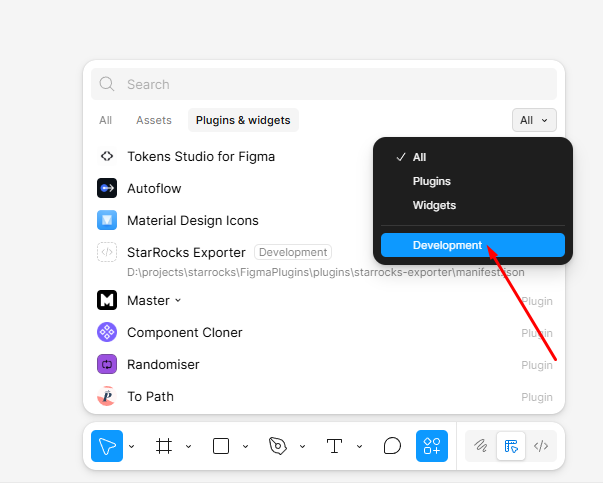
Choose Development in the right filter to see local plugins and development commands.
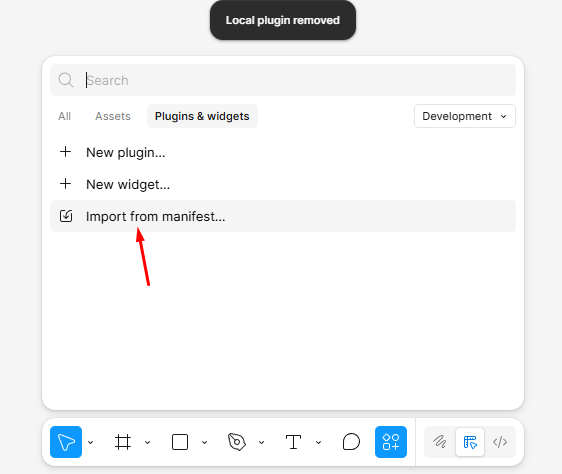
Click Import from manifest and choose manifest.json from the extracted Figma plugin folder.
Use this for the Pixso ZIP build. Pixso accepts manifest.json through the Create plugin dialog.
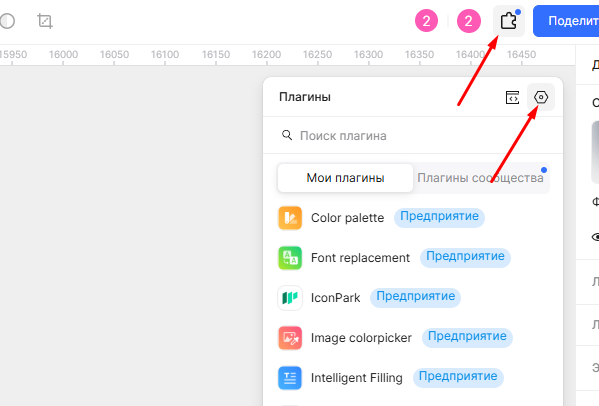
In Pixso, click Plugins on the top toolbar and open your plugin list.
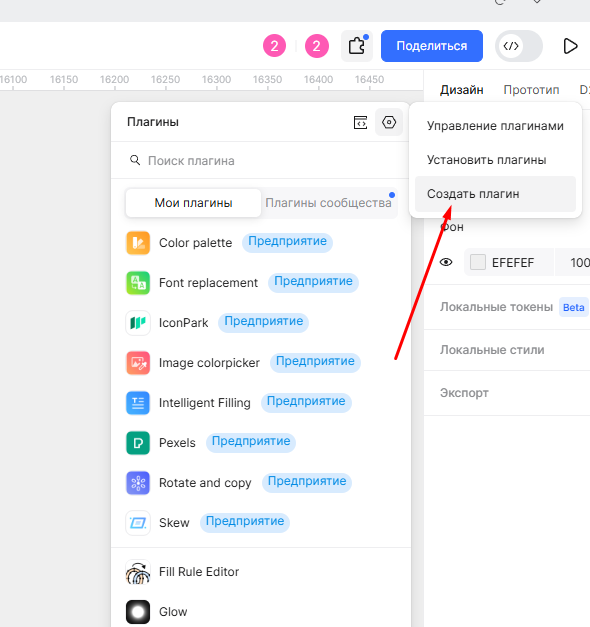
In the plugin management menu, choose Create plugin to add a local build.
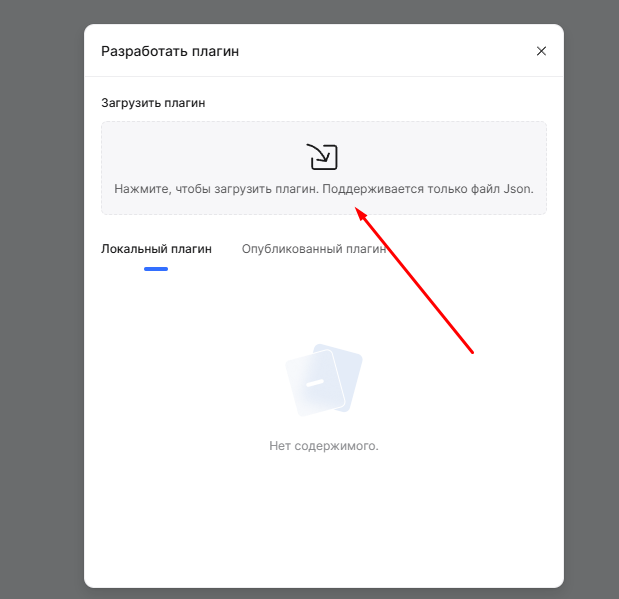
Click the upload area and choose manifest.json from the extracted Pixso plugin folder.