1
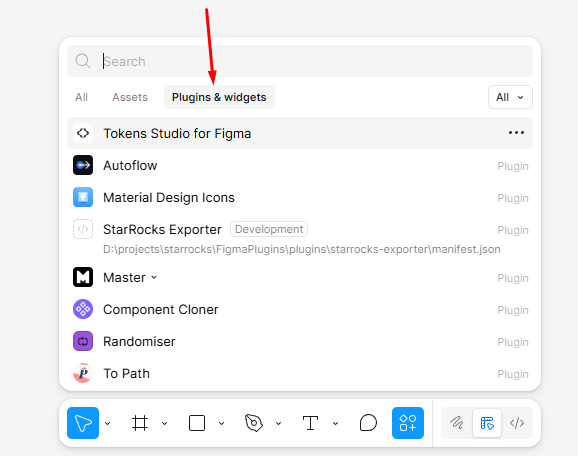
Open Plugins & widgets
In Figma, click Resources on the bottom toolbar and switch to the Plugins & widgets tab.
Download the latest public build for each platform and review fixes by version below.
Free plugin.
Adopts the shared StudioShell UI with Audit, Palette, Variables, and Settings workflows plus unified Pixso buttons and account linking.
Adopts the shared StudioShell UI with Audit, Palette, Variables, and Settings workflows plus unified Figma buttons and account linking.
Scope Pixso server token snapshots to the current file, prevent stale cross-file copy URLs, and clarify when tokens cannot be published yet.
Prevent Color Toolkit from automatically scanning the whole Figma page on startup when nothing is selected, avoiding hangs in large files.
Scope Figma server token snapshots to the current file, prevent stale cross-file copy URLs, and clarify when tokens cannot be published yet.
Polish the Figma Color Toolkit interface with compact icon tabs, color search, round swatches, a sticky status bar, and a draggable resize handle.
Fix copied server token URLs so JSON, CSS, SCSS, and Tailwind links include a browser access token, while keeping header-based API access for integrations.
Fix Pixso account authorization sync so the plugin quietly refreshes after opening a link-token URL and detects the linked account without reopening.
Fix the Pixso Variables tab so background previews use safe variable/style reads and no longer show action-failed toasts when opening the tab.
Fix Pixso scanning hangs by retrying plugin commands, adding action timeouts, capping large page audits, and falling back when Pixso variable APIs stall.
Fix copied server token URLs so JSON, CSS, SCSS, and Tailwind links include a browser access token, while keeping header-based API access for integrations.
Add English in-plugin Help content, documentation links, and refreshed chtools.pro documentation with practical Color Toolkit use cases and API examples.
Add English in-plugin Help content, documentation links, and refreshed chtools.pro documentation with practical Color Toolkit use cases and API examples.
Audit exports, token exports, update-in-place style guide generation, authenticated server token publishing, queued-command compatibility, and shared scan analysis.
Audit exports, token exports, update-in-place style guide generation, authenticated server token publishing, and shared scan analysis for duplicate variables and migration suggestions.
Keep the Pixso build aligned with the latest Color Toolkit variable assignment fixes and compatibility guards.
Fix variable creation in Figma incremental mode by passing the variable collection object when creating new color variables.
Add a compatibility guard for incomplete scan reports so the redesigned palette and variable workflows keep rendering instead of blanking the UI.
Fix the Figma standalone plugin white screen after scanning by syncing the redesigned backend with the published UI, including palette replacement and variable assignment actions.
Redesign Color Toolkit around two workflows: palette replacement with generated suggestions and preview before confirm, plus variable assignment for unbound colors using new or nearest existing color variables.
Redesign Color Toolkit around two workflows: palette replacement with generated suggestions and preview before confirm, plus variable assignment for unbound colors using new or nearest existing color variables.
Fix Pixso button delivery with the polling command bridge for refresh, scan, and rescan actions.
Initial free utility for auditing raw colors, style and variable coverage, close color groups, and text contrast warnings without modifying the document.
Initial Pixso utility for auditing raw colors, style and variable coverage, close color groups, text contrast warnings, and CHTools feedback without destructive changes.
Download the needed version, unzip it, and choose manifest.json from the extracted folder. These steps are needed while the plugin is not published in the official Figma or Pixso catalog.
Use this for the Figma ZIP build. After import, the plugin appears in Development and runs as a local plugin.
In Figma, click Resources on the bottom toolbar and switch to the Plugins & widgets tab.
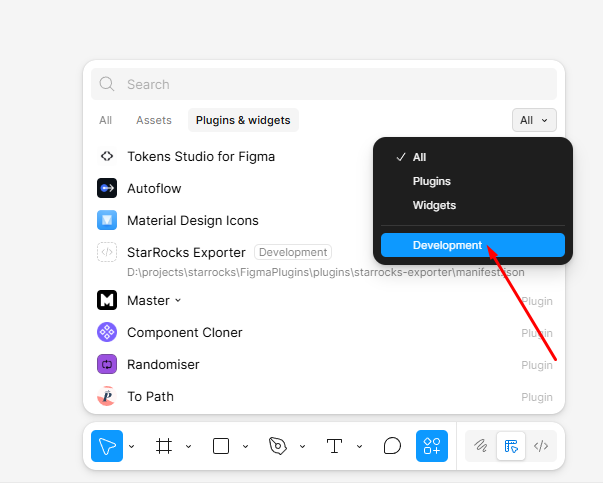
Choose Development in the right filter to see local plugins and development commands.
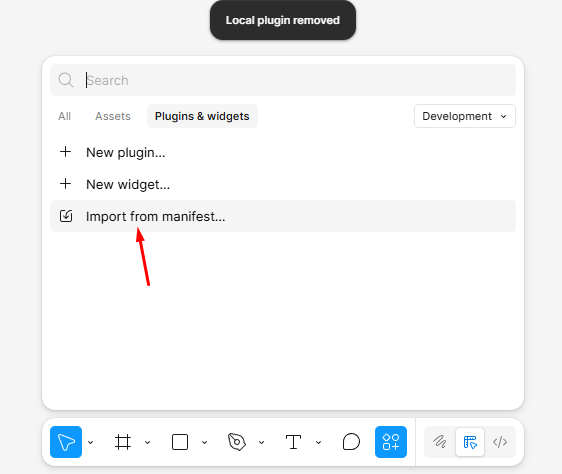
Click Import from manifest and choose manifest.json from the extracted Figma plugin folder.
Use this for the Pixso ZIP build. Pixso accepts manifest.json through the Create plugin dialog.
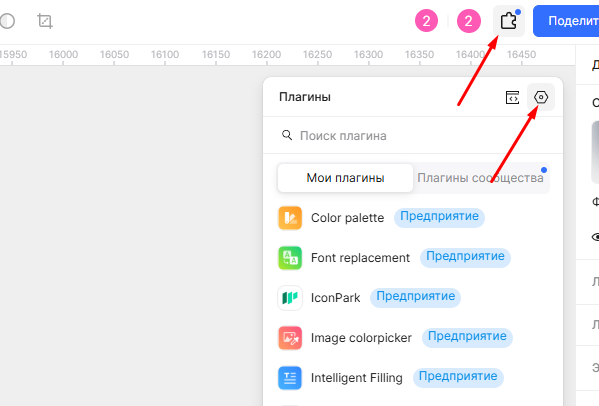
In Pixso, click Plugins on the top toolbar and open your plugin list.
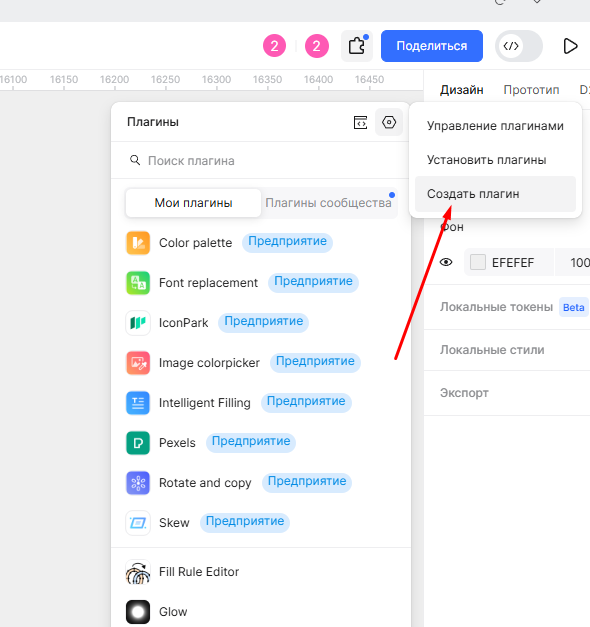
In the plugin management menu, choose Create plugin to add a local build.
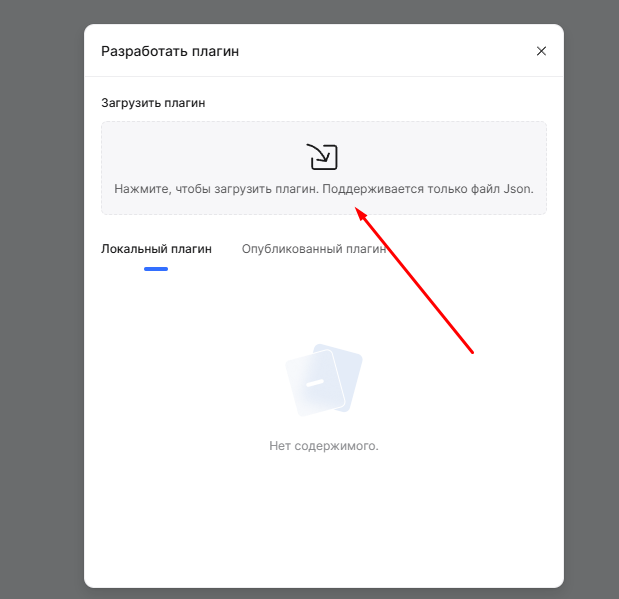
Click the upload area and choose manifest.json from the extracted Pixso plugin folder.